






Quick Reference Guide
Maps: Territories
SELECT TERRITORY SOURCE
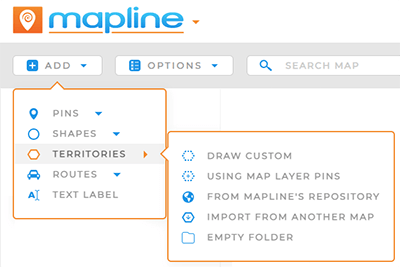
There are many different ways to add territories to your maps! Pull from different data sources to create the exact territories you need.
Choose from the following options to get started:
- DRAW CUSTOM: Draw your own territories on your map. This is ideal if you have custom territory boundaries or shapes you’d like to preserve.
- USE MAP LAYER PINS: Draw a territory around the pins contained in this map layer.
- MAPLINE’S REPOSITORY: Draw upon Mapline’s extensive territory database and enhance your map even further!
- FROM ANOTHER MAP: Import existing territories from any of your Mapline maps. This way, you never have to re-create territories!
- EMPTY FOLDER: Create an empty territory layer folder, to which you can later add custom shapes and territories.
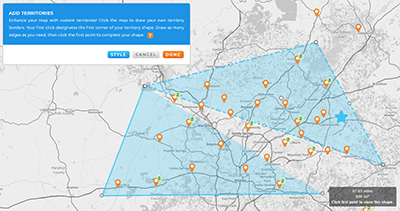
Do you have territories that don’t align with zip code or government boundaries? Draw any shape you need, no matter how irregular. As you drag your mouse, watch the distance in miles that appears in the black label next to your shape.
Once you have the right distance, click your mouse again to complete the shape.
Draw as many custom territories as you need in one go. Once you click Done, this series of territories becomes its own Layer Folder in your map sidebar.

Pro Tip: Territories appear as a new Layer Folder in your map sidebar. Look for them on the left-hand side of your screen. Map layer folders can easily be re-arranged, merged, and customized.
SELECT LAYER
First, choose from your existing pin layers. Any layer that contains pins can be used to auto-generate your territories.
Once you’ve selected the correct layer, buckle up– this is where things really get cool.

SELECT TERRITORY TYPE
Toggle between the two different boundary options to configure your territories even further.
- CREATE EACH TERRITORY SURROUNDING A SINGLE PIN: Generate an individual territory boundary around every pin in the selected layer. This is useful when each location needs its own dedicated coverage area, service zone, or sales territory.
- CREATE TERRITORIES SURROUNDING GROUPS OF PINS: Automatically group nearby pins together into shared territory boundaries. This option is ideal for clustering locations into larger operational regions, delivery zones, or sales areas based on geographic proximity.
This is such a powerful way to create custom territories around your existing map pins, in a way that’s truly tied to your data.

Leverage Mapline’s extensive repository of pre-defined, worldwide territories. Select from:
- Area codes
- Census Tracts and Blocks
- Counties and County Subdivisions
- Countries
- Legislative and Congressional Districts
- Metropolitan Statistical Areas (MSAs)
- Postcode Areas and Districts
- Provinces
- Regions
- School Districts
- States
- Zip Codes
Use the search bar to find specific territories, or expand the drop-down arrows to select from the area(s) you need. Select as many territories as needed; they will all be added to your map simultaneously.
Once you’ve selected the territories you need, click ADD TERRITORIES TO and select your desired folder. Name your folder, then click OK to add the territory boundaries to your map.

Pro Tip: Explore our extensive Territory repository containing hundreds of worldwide territories, including any country, province, state, or county you can think of! It’s never been faster to map the precise territory boundaries you need.
Don’t re-create the same territories over and over. Instead, import your existing territories in a few clicks, and BAM! You’re ready to analyze your data.
From the ADD menu, select TERRITORIES > IMPORT FROM ANOTHER MAP. Then, select your desired map and the territory group you’d like to add. When you’re done, click OK.
This is a great way to ensure accuracy across the board. Even if you have multiple different maps using different datasets, you can be certain that your territories are identical on every map.

Pro Tip: Once you’ve added the territories you need, custom style your territories! You can even base your territory styling on your data, so that any time your data changes, your maps update too. Check it out!
Once your territories are created, they become much more than simple map boundaries. Territories help organize your data geographically, making it easier to analyze performance, assign responsibilities, optimize operations, and uncover patterns that are difficult to spot in spreadsheets alone.
- Analyze performance by territory: Compare sales, service volume, customer density, revenue, or operational metrics across geographic regions.
- Assign territories to teams or reps: Organize locations by sales rep, driver, technician, franchise owner, or operational region for clearer accountability.
- Filter and segment locations geographically: Instantly isolate locations inside specific territories to focus on the regions that matter most.
- Optimize routing and scheduling workflows: Use territories to reduce drive time, minimize overlap between teams, and improve route efficiency.
- Visualize customer coverage gaps: Identify underserved regions, overlapping coverage areas, or expansion opportunities faster.
- Share interactive territory maps: Collaborate with teams by sharing live territory maps that automatically update as data changes.
- Create territory-based dashboards and reports: Build geographic dashboards that summarize KPIs and operational performance by region.

